Build Android Apps That Deliver Better Experiences and Real Business Results
From customer-facing mobile apps to enterprise solutions, we design and develop secure, scalable Android applications built around your users, business processes, and growth goals.
Discuss Your Android App Request an App Development Proposal
A Mobile App Is More Than a Collection of Screens
Businesses often struggle with slow apps, inconsistent UX, unreliable APIs, difficult maintenance, security gaps, or applications that do not solve the original business problem.
- 01 Slow performance
- 02 Poor UX
- 03 App crashes
- 04 Outdated code
- 05 Complex backend integration
- 06 Security concerns
- 07 Difficult releases
- 08 Device fragmentation
- 09 Weak analytics
- 10 High maintenance effort
Build the Right App Before Building More Features
End-to-End Android App Development
Custom Android Apps
Applications tailored to unique business requirements, workflows, user roles, and integrations.
Consumer Apps
Customer-facing apps for shopping, booking, communication, content, services, loyalty, and engagement.
Enterprise Apps
Secure internal apps for employees, field teams, operations, sales, logistics, and management.
MVP Development
Focused first releases containing the highest-value features needed to validate a product.
Android App Modernization
Refactor or rebuild legacy applications to improve performance, maintainability, security, and UX.
API & Backend Integration
Connect apps to REST APIs, authentication, databases, cloud services, payments, and business platforms.
Maintenance & Support
Updates, bug fixes, compatibility improvements, monitoring, performance work, and enhancements.
Applications for Different Business Needs
Ecommerce Apps
Product discovery, cart, checkout, orders, accounts, offers, and notifications.
Healthcare Apps
Appointments, patient services, notifications, records-related workflows, and secure communication where applicable.
Education Apps
Courses, learning content, assessments, progress tracking, and communication.
On-Demand Apps
Service discovery, booking, location-aware workflows, payments, and status updates.
Business & Productivity Apps
Task management, field operations, sales, approvals, and reporting.
Content & Media Apps
Video, audio, articles, subscriptions, personalization, and engagement.
Marketplace Apps
Buyer/seller workflows, discovery, messaging, transactions, and accounts.
SaaS Companion Apps
Mobile interfaces for existing web-based SaaS platforms and business systems.
Define What the App Must Achieve Before Development Begins
What you get out of it
- A clear, agreed scope
- Prioritised features
- User flows
- Technical direction
- An implementation roadmap
Design Android Experiences People Can Understand Instantly
- Information architecture
- User flows
- Wireframes
- Visual design
- Design system
- Navigation
- Forms
- Empty states
- Loading states
- Error states
- Accessibility
- Responsive layouts
Develop a Stable and Maintainable Android Application
Plan for the Devices Your Customers Actually Own
Screen sizes and hardware
Layouts, density buckets, tablets and foldables where the product needs them, and a defined minimum hardware profile rather than an assumption.
A supported-version range
We agree the minimum supported API level against your actual audience, then hold the app to it — including the behaviour changes newer versions introduce for background work, permissions, and notifications.
Vendor differences
Battery optimisation, background restrictions, and notification handling differ between manufacturers. Where the app depends on any of them, that gets tested rather than assumed.
Real-world connectivity
Slow and intermittent connections are the normal case for a large part of the Indian market. Caching, retries, and graceful failure are designed in, not patched on after launch.
Connect the App to the Systems Behind Your Business
REST APIs
Clear data contracts, versioned where appropriate, and resilient to the network failures mobile clients actually hit.
Authentication
Login, sessions, token handling, refresh behaviour, and role-based access aligned with your existing identity setup.
Cloud Services
Managed services for storage, messaging, notifications, and scaling, chosen against the workload rather than a default.
Payment Gateways
A provider appropriate to the target market, with the flows, failure states, and reconciliation handled properly.
Maps & Location
Location-aware workflows, tracking where the product genuinely needs it, and permission handling that users understand.
CRM & ERP
Connecting the app to the systems your business already runs on, rather than creating a parallel set of data.
Booking & Inventory
Availability, scheduling, stock, and the consistency rules that keep mobile and back office agreeing with each other.
Messaging & Webhooks
Event-driven updates, media and file storage, and third-party notifications wired in with retry and failure handling.
Protect Users, Data, and Business Operations
Build an App That Performs Under Real-World Conditions
Performance focus
- Startup time
- Memory usage
- Network efficiency
- Media optimization
- Battery impact
- Smooth UI
- Caching
- Background work
- Error recovery
Reliability focus
- Crash monitoring
- Logging
- Retry strategies
- Poor-network handling
- Graceful failure
- Production monitoring
Test the App Before Customers Depend on It
- Functional testing
- UI testing
- API testing
- Integration testing
- Regression testing
- Device testing
- OS-version testing
- Network testing
- Performance testing
- Security testing
- Accessibility testing
Understand How Customers Use Your App
Events worth instrumenting
What we watch
- Activation
- Engagement
- Retention
- Conversion
- Feature adoption
- Funnel completion
- Crash rate
- Session performance
Prepare Your Android App for Production
Release configuration
Build variants, signing, and versioning set up so releases are repeatable rather than manual.
Store listing assets
Description, screenshots, and graphics prepared against the listing's own requirements.
Privacy & permissions
Data-safety information and a permissions review, so what the app requests matches what it actually needs.
Testing tracks
Internal, closed, or open testing before anything reaches production users.
Staged rollout
Release to a percentage of users first, watch the numbers, then widen — so a bad build reaches a fraction of your base, not all of it.
Post-release monitoring
Crash and vitals monitoring from the first day, with a plan for who responds and how quickly.
From Idea to Production-Ready Android App
Discover
Understand business goals, users, workflows, competitors, and constraints.
Define
Document requirements, user stories, priorities, integrations, and MVP scope.
Design
Create user flows, wireframes, UI, design system, and prototype.
Architect
Define architecture, APIs, data flow, authentication, integrations, and deployment.
Develop
Implement prioritized features, backend connections, local data, notifications, and business logic.
Integrate
Connect payment, maps, CRM/ERP, cloud, analytics, and other systems.
Test
Run functional, device, performance, security, integration, and regression testing.
Release
Prepare production build, store assets, rollout plan, monitoring, and documentation.
Improve
Use analytics, feedback, and business results to prioritize future releases.
Modernize Legacy Android Applications Without Losing Business Value
We assess the existing application first, identify the risk and business-critical areas, and only then recommend incremental modernization or a controlled rebuild. If a wider legacy estate is involved rather than one app, that work is covered on our app modernisation and integration page.
Native Android or Cross-Platform? It Depends on the Product
- Heavy use of device hardware or OS-level features
- Demanding performance or graphics requirements
- Android-only products, including most internal enterprise apps
- Long-lived apps where platform changes must be adopted early
- Shipping to Android and iOS with one team and one budget
- Mostly standard UI and API-driven screens
- MVPs where speed to a testable product matters most
- Products where feature parity across platforms is the priority
We Build Android Apps Around Business Outcomes
Android Apps Built for Real Business Use Cases

Healthcare Platform
A medical platform website with online booking, an admin panel and patient self-service — plus a companion booking and admin experience for the app side. Real, shippable proof of work built by our team.
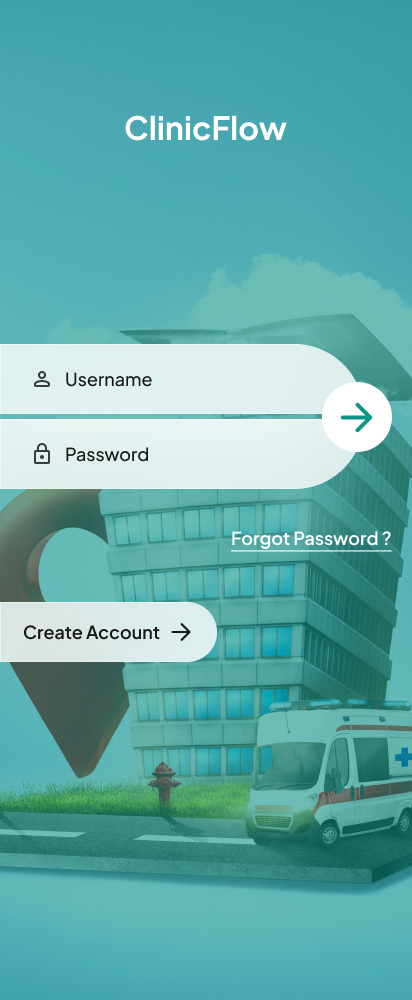
Clinic Booking App
Login and onboarding design for a clinic appointment booking app.
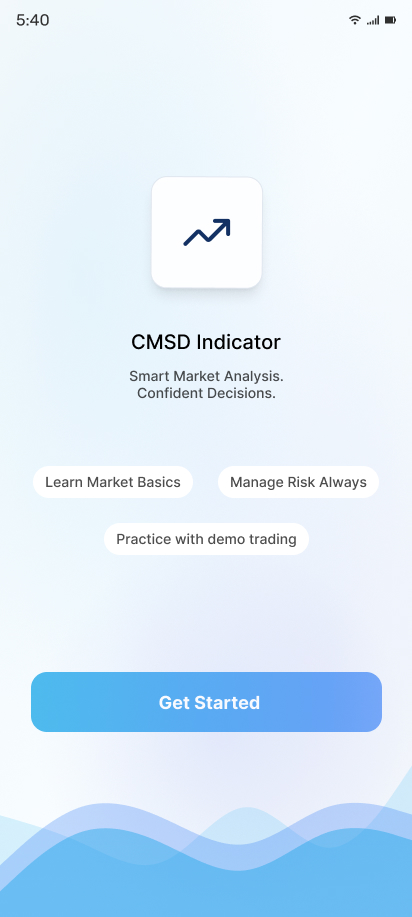
Market Analysis App
Onboarding design for a market analysis and trading indicator app.
What Our
Clients Say
Highest rated with an average 4.92 out of 5.00 from 13 reviews
"We received exceptional service for our website redesign and digital marketing campaign. The team's professionalism, technical expertise, and commitment to quality exceeded our expectations."
"Their web development expertise is impressive. The project was completed on schedule, and the after-sales support has been outstanding. We look forward to working with them again."
"The app development team was professional and supportive. They understood our business needs and delivered a reliable application with all the required features."
"Their digital marketing strategies helped us increase our online inquiries significantly. The team was knowledgeable, responsive, and transparent throughout the campaign."
"Their website development team built a fast, secure, and mobile-friendly website for our clinic. We have received many positive comments from our patients."
"Excellent service from start to finish. Their digital marketing efforts improved our search rankings and generated quality business leads within a few months."
Android Development Options for Different Product Stages
MVP Development
Product discovery, UX/UI, core Android features, backend integration, analytics, testing, and launch preparation.
Business App
Custom UX/UI, multiple user roles, integrations, notifications, analytics, testing, deployment, and support.
Enterprise Android App
Complex workflows, security requirements, enterprise integrations, role-based access, monitoring, and scalable architecture.
App Modernization
Existing-app audit, technical improvements, UI modernization, migration or refactoring, testing, and release support.
Ongoing Development
Maintenance, updates, new features, performance optimization, monitoring, and technical support.