Build High-Quality Cross-Platform Apps With Flutter
Create modern mobile experiences for iOS and Android from a scalable Flutter foundation. We combine product strategy, UX/UI, Flutter engineering, backend integration, testing, and launch support to turn your app idea into a production-ready product.
Discuss Your Flutter App Request a Flutter App Proposal
Cross-Platform Does Not Mean One-Size-Fits-All
Businesses choose a shared codebase for efficiency, and it delivers that. What it does not do on its own is protect you from poor architecture, weak UX decisions, unsuitable plugins, or thin testing — each of which turns the saving into a maintenance bill later.
- 01 Duplicate development effort
- 02 Inconsistent platforms
- 03 Slow delivery
- 04 Poor architecture
- 05 Plugin dependency issues
- 06 Native feature limitations
- 07 Performance problems
- 08 API complexity
- 09 Difficult releases
- 10 Weak testing
One Product Strategy. One Maintainable Codebase. Multiple Platforms.
End-to-End Flutter App Development
Custom Flutter Apps
Applications built around unique business workflows, customer journeys, user roles, and integrations.
Flutter MVP Development
Turn a product concept into a focused first release designed to validate the highest-value assumptions.
Business Apps
Operational, productivity, sales, service, booking, field, and workflow applications.
Consumer Apps
Mobile experiences for ecommerce, content, communities, subscriptions, services, and customer engagement.
Enterprise Flutter Apps
Scalable applications with authentication, role-based workflows, enterprise integrations, analytics, and security requirements.
Flutter App Modernization
Improve an existing Flutter application through architecture, dependency, performance, UX, testing, and maintainability work.
Flutter + Native Integration
Connect Flutter with platform-specific capabilities when native iOS or Android functionality is required.
API & Backend Integration
Connect apps to REST APIs, authentication, databases, cloud platforms, payments, CRM/ERP systems, and business services.
Maintenance & Support
Bug fixes, dependency updates, OS compatibility, performance optimization, monitoring, and feature releases.
When Flutter Is the Right Technology Choice
Flutter Draws Its Own Interface. That Decides Most of the Trade-Offs.
- The same UI everywhere. A screen looks identical on an iPhone 15 and a four-year-old Android, because it is not depending on either platform's widget set.
- Brand-led design without a fight. If your design team has produced something distinctive rather than stock, Flutter will build it without working around platform components.
- Animation and custom graphics. Complex motion, custom charts, and heavily styled interfaces are ordinary work here rather than a specialist exercise.
- Fewer platform surprises. The rendering behaviour does not shift underneath you when an OS updates its own controls.
- A larger app download. The engine ships with the app. Usually irrelevant; occasionally it matters for a market where download size affects installs.
- Platform conventions are emulated, not inherited. Flutter reproduces iOS and Android patterns well, but they are reproductions, and staying current with both is deliberate work.
- Accessibility needs attention. Screen readers, dynamic text sizing, and system contrast settings all work, but they are wired up rather than free.
- Embedding native views has a cost. Mixing platform views into the Flutter canvas — maps, some SDK widgets — is supported but not free.
Build Flutter Apps for Different Business Models
Ecommerce
Catalogs, search, cart, checkout, orders, accounts, offers, and notifications.
Healthcare
Appointments, patient services, secure communication, notifications, and workflow support where appropriate.
Education
Courses, learning content, assessments, progress, communication, and notifications.
On-Demand
Service discovery, booking, location, payments, status updates, and customer communication.
SaaS Companion Apps
Mobile access to web-based SaaS platforms, dashboards, workflows, and alerts.
Marketplace
Buyer and seller workflows, discovery, messaging, transactions, and account management.
Business Productivity
Tasks, approvals, field operations, sales, reporting, and internal workflows.
Content & Media
Video, audio, articles, subscriptions, personalization, and engagement.
Define the Product Before Choosing the Implementation
What you get out of it
- Product scope
- Feature priorities
- User flows
- Technical direction
- An architecture approach
- A delivery roadmap
Create One Consistent Experience Across iOS and Android
- Information architecture
- User flows
- Wireframes
- High-fidelity UI
- Design system
- Navigation
- Forms
- Empty states
- Loading states
- Error states
- Accessibility
- iPhone layouts
- Android layouts
- Tablet layouts
Build a Flutter Foundation That Can Scale With Your Product
One Language, and a Package Ecosystem Worth Reading Carefully
A new language for almost everyone
Dart is small, strongly typed, and familiar to anyone who has written Java, Kotlin, Swift, or TypeScript. Experienced developers become productive quickly. But it is not a language your existing web team already writes, which matters when you plan who maintains the app after launch.
If you already employ React developers, that consideration points somewhere else — see the comparison further down this page.
Packages are a scoping decision
Flutter's package ecosystem is large and covers most integrations you will need. Quality varies. A package that is unmaintained, single-author, or lagging behind the current Flutter release is a future migration you have not budgeted for.
We check maintenance status, release cadence, and platform coverage before a dependency goes into the project, and we say which ones are load-bearing so you know where the risk sits.
Connect Flutter Apps to the Systems Behind Your Business
REST APIs
Clear data contracts, versioned where appropriate, and resilient to the network failures mobile clients actually hit.
Authentication
Login, sessions, token handling, refresh behaviour, and role-based access aligned with your existing identity setup.
Databases
Server-side data access designed for a mobile client's access patterns rather than a web page's.
Cloud Services
Managed services for storage, messaging, notifications, and scaling, chosen against the workload rather than a default.
Payment Gateways
A provider appropriate to the target market, with the flows, failure states, and reconciliation handled properly.
Maps & Location
Location-aware workflows and permission handling that users understand, with the platform-view cost accounted for.
CRM & ERP
Connecting the app to the systems your business already runs on, rather than creating a parallel set of data.
Messaging & Webhooks
Event-driven updates, media and file storage, and third-party notifications wired in with retry and failure handling.
Use Native iOS and Android Capabilities When They Add Value
Protect Your App, APIs, and User Data
Build a Cross-Platform App That Feels Fast and Reliable
Performance focus
- App startup
- UI rendering
- Memory usage
- Network efficiency
- Image & media optimization
- Battery impact
- Large lists & data
- Caching
- Background work
Reliability focus
- Crash monitoring
- Error logging
- Retry strategies
- Poor-network handling
- Graceful failure
- Production monitoring
Test Across Real Devices, Platforms, and User Journeys
- Unit testing
- Widget/UI testing
- Integration testing
- API testing
- Regression testing
- iOS testing
- Android testing
- Device testing
- OS-version testing
- Network testing
- Performance testing
- Security testing
- Accessibility testing
Measure What Users Actually Do
Events worth instrumenting
What we watch
- Activation
- Engagement
- Retention
- Conversion
- Funnel completion
- Feature adoption
- Crash rate
- Session performance
Prepare Your Flutter App for iOS and Android Release
Build & environments
Build configuration, versioning, signing, and environment management set up per platform so releases are repeatable.
App Store preparation
iOS build, provisioning, listing assets, and the metadata Apple asks for in its own format.
Google Play preparation
Android build, signing, listing assets, and data-safety information prepared against Play's current requirements.
Privacy & permissions
Privacy information and a permissions review on both platforms, so declarations match what the app actually does.
Testing tracks
TestFlight and Play testing tracks used properly before anything reaches production users.
Rollout & monitoring
Production rollout with crash and performance monitoring live from day one on both stores.
From Idea to Cross-Platform Production App
Discover
Understand business objectives, users, workflows, competitors, constraints, and platform requirements.
Define
Document requirements, user stories, acceptance criteria, priorities, integrations, and MVP scope.
Choose
Confirm Flutter is appropriate against product, platform, performance, integration, and maintenance requirements.
Design
Create user flows, wireframes, high-fidelity UI, design system, and prototype.
Architect
Define Flutter architecture, state management, API contracts, data flow, authentication, native integrations, and deployment.
Develop
Build shared features, platform integrations, backend connections, local data, notifications, and business logic.
Test
Validate functionality across iOS, Android, devices, networks, integrations, security, and performance.
Release
Prepare store builds, assets, signing, rollout plans, monitoring, and documentation.
Improve
Use analytics, customer feedback, support data, and business outcomes to prioritize future releases.
Modernize Existing Flutter Applications
We audit the existing codebase first, identify the high-risk and business-critical areas, then modernize incrementally or rebuild selected components where that is genuinely the better value. If the problem spans a wider legacy estate rather than one app, that work sits on our app modernisation and integration page instead.
The Honest Comparison, Including When React Native Wins
- The design is distinctive and brand-led, and you want it pixel-identical on both platforms
- The product leans on animation, custom graphics, or heavily styled interfaces
- You are starting fresh with no existing mobile or React team to build on
- You want fewer moving parts — one language, one toolchain, one UI layer
- You already employ React or TypeScript developers who can maintain the app
- The UI is mostly standard components and should feel native rather than custom
- Shipping content or logic changes without waiting on store review has real business value
- You want to share code or libraries with an existing React web product
In practice, the deciding factor is usually your team, not the framework
On most projects the technical difference between the two is smaller than the difference between a team that knows the framework and one that is learning it. If you have React developers, that is a strong argument on its own. If you have neither, the design requirements decide it.
We build on both, so we have nothing to gain from steering you. If React Native fits your situation better, that page is here — and if the answer is actually native, the Android and iOS pages cover that case.
We Treat Flutter as a Product Engineering Choice, Not Just a Framework
Flutter Apps Built Around Real Business Problems

Healthcare Platform
A medical platform website with online booking, an admin panel and patient self-service — plus a companion booking and admin experience for the app side. Real, shippable proof of work built by our team.
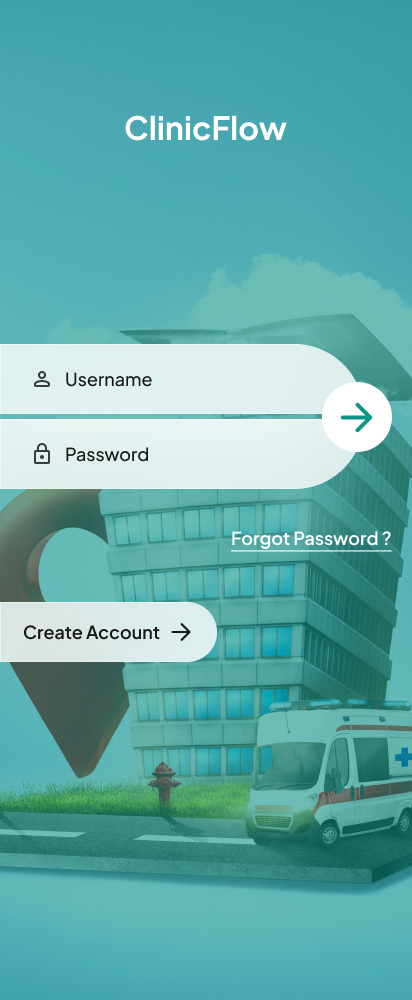
Clinic Booking App
Login and onboarding design for a clinic appointment booking app.
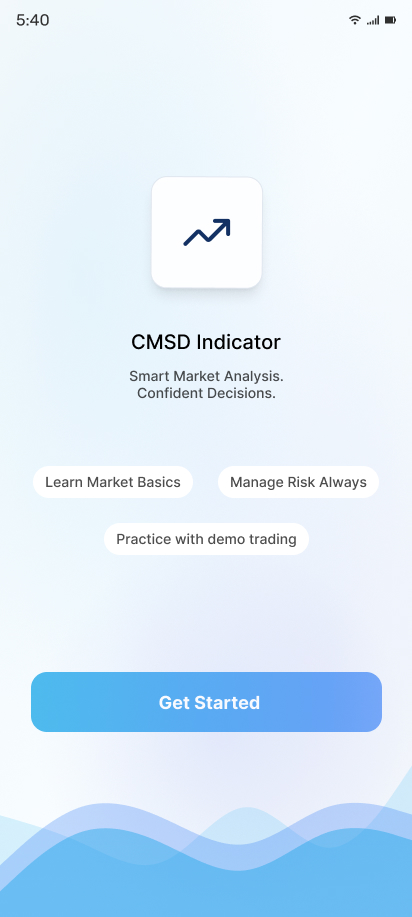
Market Analysis App
Onboarding design for a market analysis and trading indicator app.
What Our
Clients Say
Highest rated with an average 4.92 out of 5.00 from 13 reviews
"We received exceptional service for our website redesign and digital marketing campaign. The team's professionalism, technical expertise, and commitment to quality exceeded our expectations."
"Their web development expertise is impressive. The project was completed on schedule, and the after-sales support has been outstanding. We look forward to working with them again."
"The app development team was professional and supportive. They understood our business needs and delivered a reliable application with all the required features."
"Their digital marketing strategies helped us increase our online inquiries significantly. The team was knowledgeable, responsive, and transparent throughout the campaign."
"Their website development team built a fast, secure, and mobile-friendly website for our clinic. We have received many positive comments from our patients."
"Excellent service from start to finish. Their digital marketing efforts improved our search rankings and generated quality business leads within a few months."
Flutter Development Options for Different Product Stages
MVP Development
Product discovery, UX/UI, core Flutter features, backend integration, testing, analytics, and launch preparation.
Business App
Custom UX/UI, user roles, integrations, notifications, analytics, testing, deployment, and support.
Enterprise Flutter App
Complex workflows, security requirements, enterprise integrations, role-based access, monitoring, and scalable architecture.
Flutter Modernization
Codebase audit, dependency and architecture improvements, UI modernization, performance work, testing, and release support.
Ongoing Development
Maintenance, Flutter and Dart updates, new features, performance optimization, monitoring, and technical support.